Here’s how Canva handle 25 billion events a day
Datumgen
What is Datumgen?
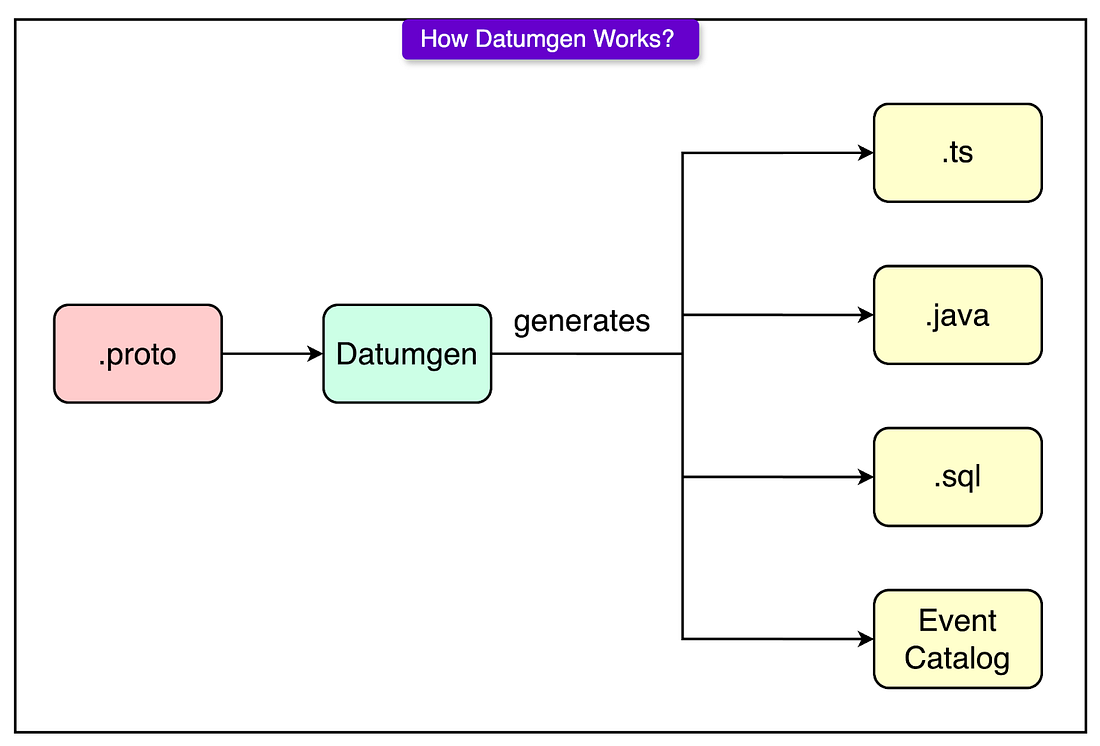
It is a code generation and schema enforcement tool built on top of protobufs (protoc)
What’s the difference between Datumgen and protobufs?
Unlike in protobufs which only generate backend serialization code, Datumgen also generate frontend analytics client code, SQL schema, and routing configs.
Datumgen also enforces some company best practices, for instance, there is an enforcement that every type must have a human ownership and inline documentation for each field
Architecture
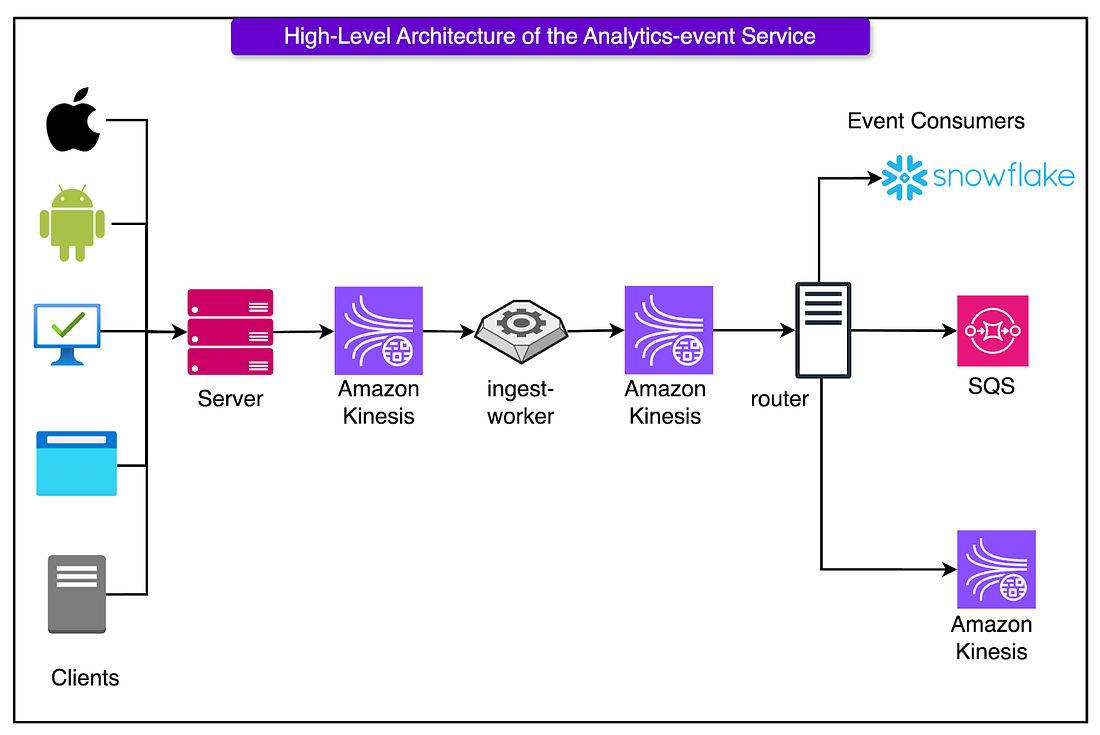
Collect (First layer)
In the first layer, we want to collect the data we need from the clients. The challenge here is that we have clients from multiple different platforms, and we want to create one single implementation of an analytics client to collect the information we need.
To do so, Canva made use of a WebView shell, which is a Typescript analytics client that can run on all platforms. Only a thin native layer is used to grab platform specific information, the rest, from event structure to queuing, is handled in one shared codebase
Server (Second Layer)
Here, we have a server which its main goal is to act as a firewall against bad data.
It checks if each event matches its expected schema, and if it does not it is dropped immediately. It validates fast, then queues the data on to Amazon Kinesis, and moves on
What is Amazon Kinesis used for?
Amazon Kinesis is used as an ingestion buffer, protecting the later layers from bursts of data. It ensures that the next layer receives data is a constant manner.
Ingest Worker (Third Layer)
Here the worker pulls the data from Amazon Kinesis Data Streams (KDS) and enriches it with more information, such as
- Geolocation enrichment based on IP
- Device fingerprinting from available metadata
- Timestamp correction to fix clock drift or stale client buffers Once they are enriched, it is passed on to the next KDS
Why can't we enrich it on the client, or on the server?
- It keeps the enrichment logic separate from the ingestion path, preventing slow lookups and calls from impacting the front-end latencies
- It helps isolate faults, so if an enrichment fails, it doesn’t block new events from coming into the pipeline
Router (Fourth Layer)
Here the router will route the data to the correct downstream consumers
- Pulls enriched events from the second Kinesis Data Stream (KDS)
- Matches each event against the routing configuration defined in code
- Delivers each event to the set of downstream consumers that subscribe to its type
Canva delivers analytics events to a few key destinations, each optimised for a different use case:
- Snowflake (via Snowpipe Streaming): This is where dashboards, metrics, and A/B test results come from. Latency isn’t critical. Freshness within a few minutes is enough. However, reliability and schema stability matter deeply.
- Kinesis: Used for real-time backend systems related to personalisation, recommendations, or usage tracking services. Kinesis shines here because it supports high-throughput parallel reads, stateful stream processing, and replay.
- SQS Queues: Ideal for services that only care about a handful of event types. SQS is low-maintenance and simple to integrate with.
Problems & Alternative Solutions
KDS Tail Latency
When shards approach their 1MB/s write limits, the latency will spike.
To handle such latency spikes, we add a fallback to SQS, the server can write to both Kinesis and SQS
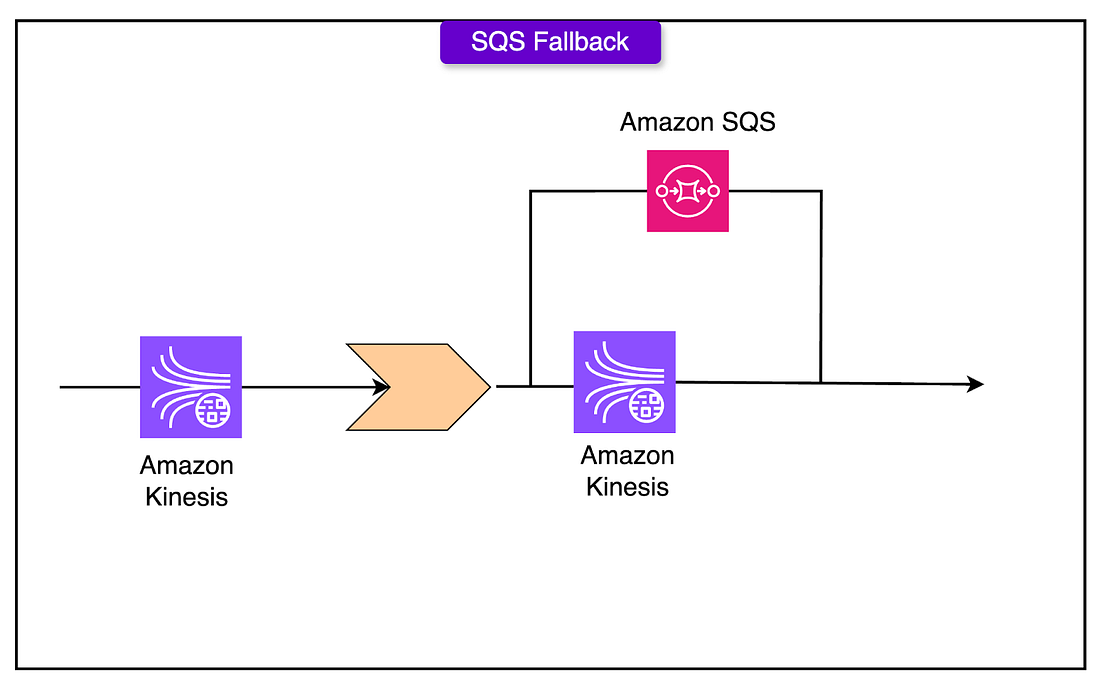 The ingest worker, can then read from both.
Why can't we just scale Kinesis horizontally by adding more shards?
Adding new shards will require some time. Scaling by adding more shards just for a short bursts will just lead to increased latency as resources are required to add new shards
Kafka
Amazon MSK (Managed Kafka) offered a 40% cost reduction but came with significant operational overhead: brokers, partitions, storage tuning, and JVM babysitting.