https://www.youtube.com/watch?v=ED1oc7gn5uY
🌱 Big Picture
Starting a simple Java program (like HelloWorld) involves much more than just executing main(). The JVM must first build its entire runtime “universe”: allocate memory, choose a GC, load core classes, and link them — all before your code runs.
1️⃣ Starting the JVM
- Command: Running
java MyAppkicks off JVM startup. - Entry point: Internally calls
JNI_CreateJavaVM(part of the JNI interface). - Tasks at this stage:
- Parse and validate VM arguments
- Validate the main class
- Check system resources (processors, memory, OS utilities)
2️⃣ Environment Preparation
- System resource checks:
- Number of processors → influences GC choice
- Available memory
- GC selection:
- Default = G1GC
- If single CPU or < 1.7 GB memory → fallback to Serial GC
- Performance data (HSPerfData):
- HotSpot-specific
- Used by tools like
jconsole,jvisualvm - Stored in temp directory
- GC roots formed here:
- The JVM internals (class loaders, runtime tables, monitors).
- The main thread object (
java.lang.Thread) is created in the heap and registered → pinned as a root.
3️⃣ Memory Regions Setup
- Heap initialisation: Divided into Young (Eden + Survivor spaces) and Old Gen.
- Metaspace:
- Stores class metadata (replaced PermGen since Java 8).
- Allocated from native memory, but still managed by GC.
- Equivalent to “Method Area” in JVM spec.
4️⃣ Class Loading (Spec §5.3)
- Performed by the bootstrap class loader (native machine code).
- Loads essential classes first:
java.lang.Object(root of all classes)java.lang.String,java.lang.Class
- Classes are loaded in tree order (dependencies first).
- At load time, classes are in a “loaded but not ready” state.
- GC roots formed here:
- Static field references of core classes.
- These remain roots for as long as the class is loaded.
- Any static variables in your class.
Class Loaders
There are 2 different types of class loaders, the Bootstrap Class Loader and the User-Defined Class Loader
|Feature|Bootstrap Class Loader|User-Defined Class Loader| |---|---|---| |Implemented in|Native code (inside JVM)|Java (extends
ClassLoader)| |Loads|Core JDK classes (java.lang.*,java.util.*)|Custom or application-specific classes| |Source|JDK modules /JAVA_HOME/lib|Anywhere: JAR, network, DB, encrypted file| |When used|JVM startup, always first|On-demand by application/framework| |ClassLoader instance|Represented asnullingetClassLoader()|Non-null, explicitly created|
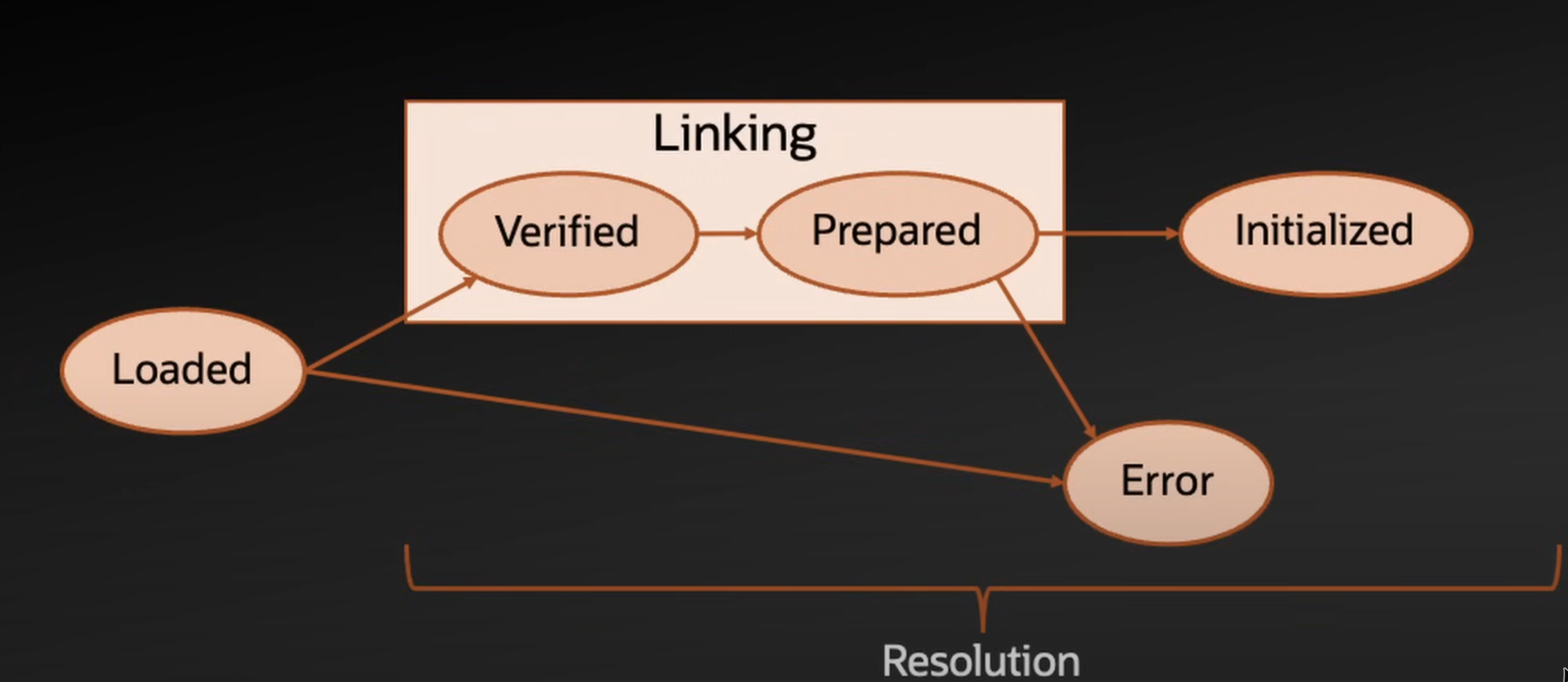
5️⃣ Linking (Spec §5.4)
Three sub-steps:
- Verification
- Ensures the class is structurally correct.
- May trigger loading of additional classes.
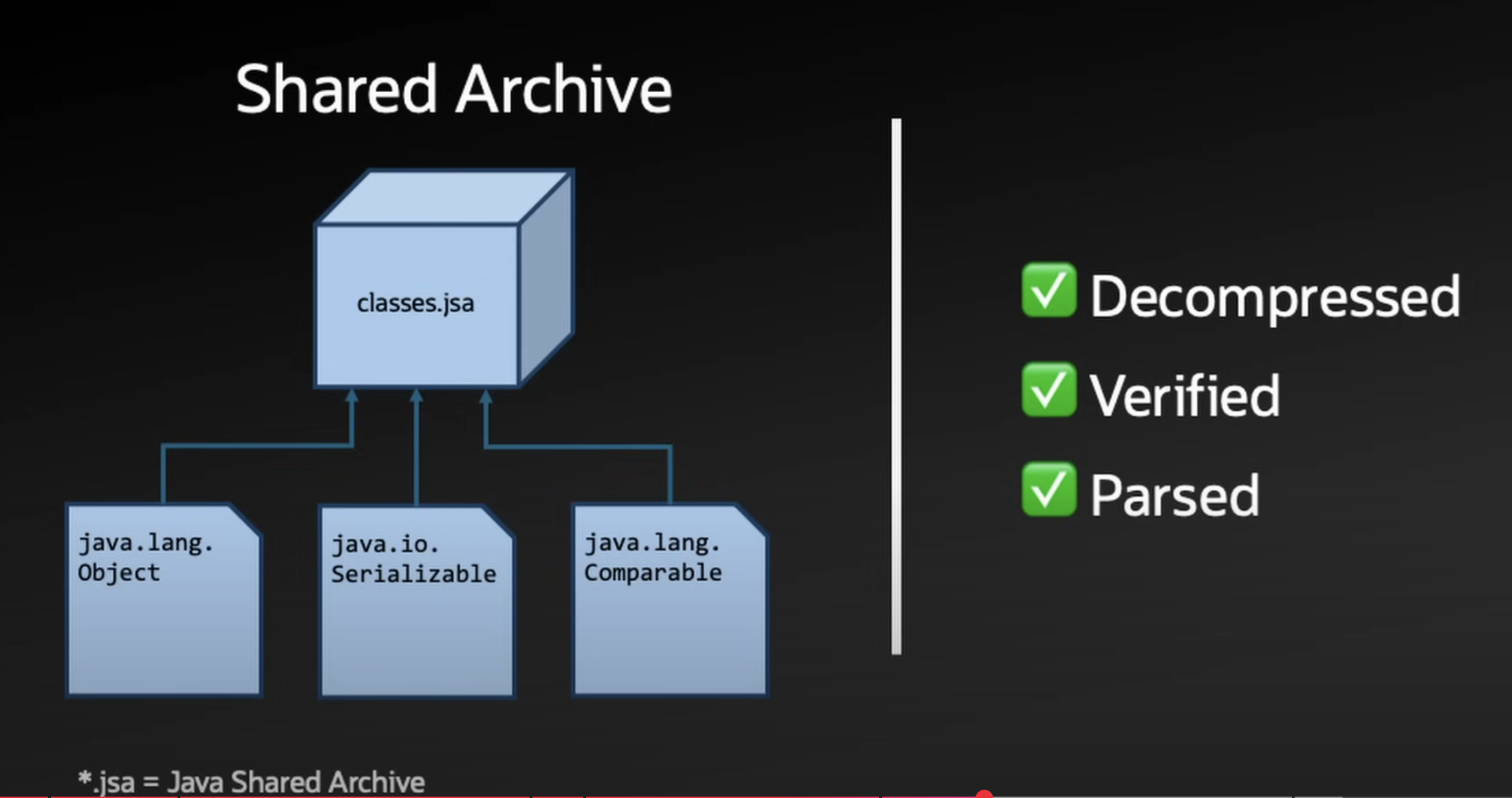
- JDK classes often skip this step (verified ahead of time via Class Data Sharing).
- Preparation
- Allocate memory for static fields.
- Initialise them to default values (
0,null, etc.).
- Resolution
- Resolve symbolic references in the constant pool → actual references to methods/fields/classes.
- Can happen eagerly or lazily (on first use).
6️⃣ Initialization (Spec §5.5)
- Executes:
- Static initializers (
static { ... }) - Assignments to static fields
- Static initializers (
- Done via a special synthetic method:
<clinit>()V→ automatically generated by the compiler.
- Distinct from instance initialization (
<init>constructor).
7️⃣ User Code Execution
- After ~450 core classes are loaded, linked, and initialized (~62 ms in tests),
the JVM finally calls
public static void main(String[] args). - At this point, the HelloWorld program actually begins.
🔮 Future of JVM Startup
- Project Leyden: Optimise startup and footprint.
- AOT (Ahead-of-Time) class loading/linking replaces old CDS (Class Data Sharing) terminology.
- JEP 483: AOT class loading/linking coming in JDK 24.
🧠 Key Takeaways
- JVM startup is much more complex than just calling
main(). - Steps include:
- Argument validation
- GC selection
- Metaspace setup
- Class loading, linking, and initialization
- Tools like CDS/AOT are being introduced to speed up this process.
 ┌───────────────────────────────────────────────────────────────┐
 │                        JVM Startup Flow                       │
 └───────────────────────────────────────────────────────────────┘

 java MyApp
      │
      ▼
 JNI_CreateJavaVM (native entry point)
      │
      ▼
 Parse + validate VM args & main class
      │
      ▼
 System resource checks (CPU, memory, OS utils)
      │
      ├── If ≥ 2 CPUs & ≥ 1.7 GB RAM → G1GC
      └── Else → Serial GC
      │
      ▼
 Setup environment (HSPerfData, monitoring hooks)
      │
      ▼
 Initialize memory regions
   ├─ Heap (Young Gen: Eden + Survivor, Old Gen)
   └─ Metaspace (class metadata, native memory)
      │
      ▼
 Class Loading (bootstrap loader)
   ├─ java.lang.Object
   ├─ java.lang.String
   └─ java.lang.Class … (and dependencies)
      │
      ▼
 Linking
   ├─ Verification (structural checks)
   ├─ Preparation (static fields → default values)
   └─ Resolution (constant pool → real refs)
      │
      ▼
 Initialization
   ├─ Run <clinit>() (static initializers & fields)
   └─ Mark class as initialized
      │
      ▼
 User code starts:
   → main(String[] args)